Fitness Track?

if_running_man_296209

Do you fitness track? If you have a fitness routine and a tracker, how well do they work together to inform you about your progress?

They’re getting smaller and smaller–I just saw news of an Apple-compatible one that’s simply a ring, yet it does all of the things:
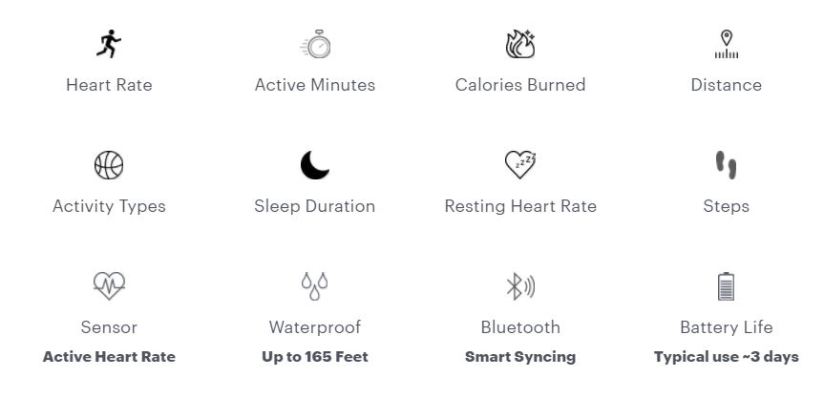
Motiv

Here’s a review from PC Mag: https://www.pcmag.com/review/356274/motiv-ring

If you’re really considering getting a fitness tracker, or a new one, though, or just want to know about how they work, then check out a broader review as Consumer Reports has: https://www.consumerreports.org/cro/fitness-trackers/buying-guide/index.htm 

Personally, I’ve been trying out the BellaBeat. It’s lovely because I do feel more inclined to pay attention to my wellness, and I don’t really mind wearing it. I do feel disappointed though, because I thought it might monitor heartrate, and I didn’t really investigate how it does the things it claims to do. I think I overlooked that “little” detail, and learned, once again, that it’s easy to get caught up in hype or indecision and just make a decision that doesn’t old true to your starting criteria. Now I’m here to encourage #InformedDecisions.

@PCMag, @ConsumerReports, #FitnessTrackers, #ConsumerLiteracy

Popular iPhone Features

iPhone questions have recently been flooding in from users who are new to smartphones. What features do people seem to love the most?

if_iPhone_2639843

Maps

Use your phone’s GPS capability to locate where you are, where you want to go, and then listen to route directions as you travel. Learn more at: https://www.apple.com/ios/maps/ 

Dictation

Use your phone’s speech-to-text feature to have your iPhone type the words you are speaking. Here are some tips: https://www.macworld.com/article/2048196/beyond-siri-dictation-tricks-for-the-iphone-and-ipad.html

Texting

Send brief messages to other cell phones or text services. Here are some starting pointers from apple about the iPhone’s Messages app: https://support.apple.com/en-us/HT201287

if_tap-screen_1504653HINT: Newer iPhones have fancy features where the force of your touch on the screen matters. If the iPhone is not doing what you intend, then I suggest visiting https://support.apple.com/en-us/HT20505 to learn where the settings are–once there, you’ll see how sensitive your iPhone is to your touch.

#iphonebasics

Computer Basics Reference Sheets

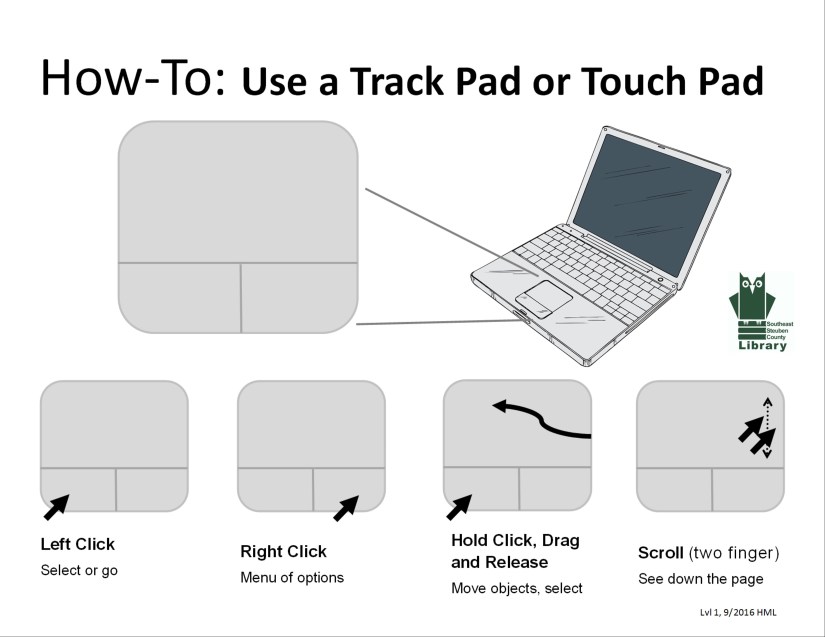
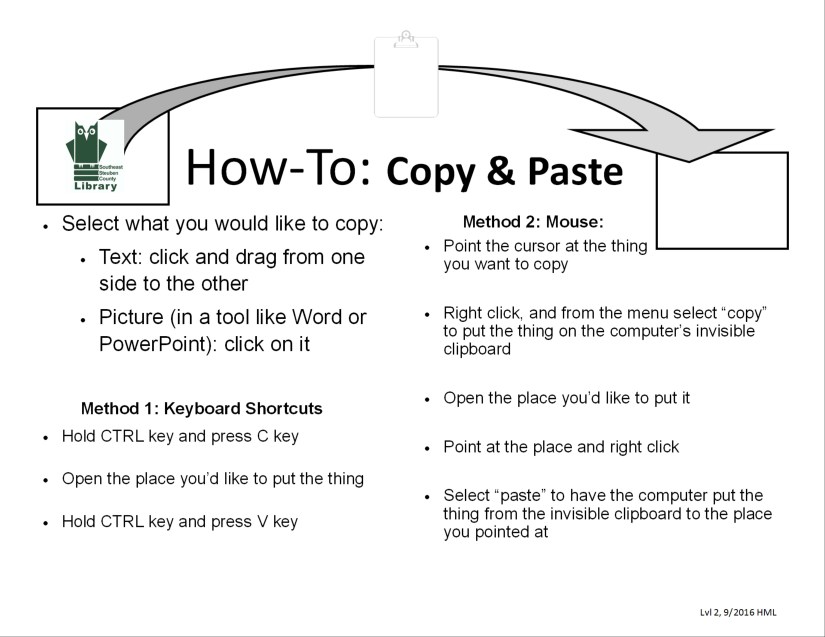
When we’re immersed in technology it can be easy to forget that others don’t necessarily immerse themselves. Or if you’re usually on a smartphone or tablet, it might be difficult to use a mouse, track pad/touch pad. Here are some guides I made to share with those who would like a reference at the computer. Do you know someone who rarely uses computers? Let them know our library is interested in helping them out, and/or share these tips:Mouse BasicTouchPad BasicCopy and Paste

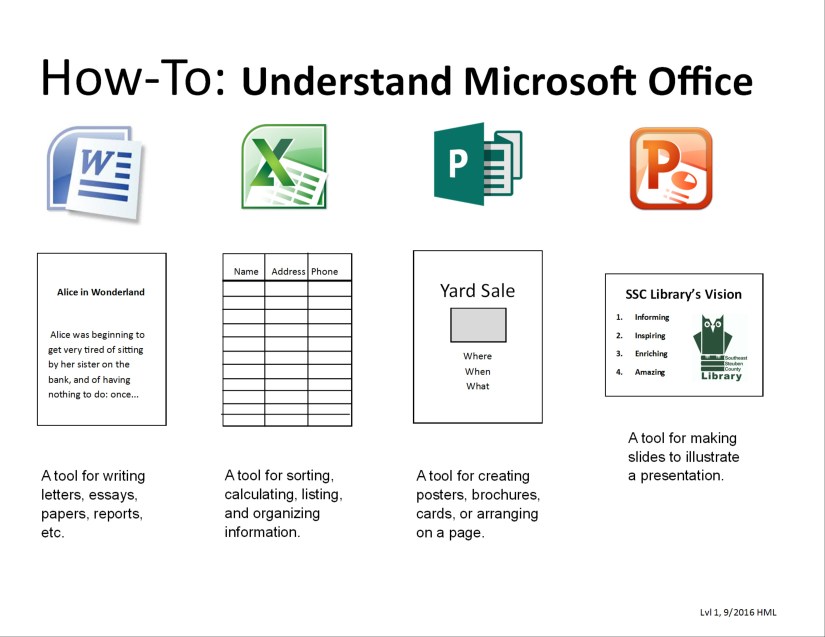
Move FilesMS Office Desc

Let’s Talk Games

Talking about games is one of the best parts, I think. It’s the awe, the enthusiasm, the surprise, and the shared experience when you are familiar with a popular game or a really well-made game (Flappy Bird, Angry Birds, Candy Crush, Legend of Zelda, Zork, etcetera–)

If you play games–puzzle, platform-er, roll-playing, multiplayer, online, etcetera–

On your tablet, phone, computer, console, etcetera–

I have a recommendation for you: consider watching Extra Credits. They put a lot of experience, skill, and information into their videos, and I really enjoy watching them. The most recent one I watched was on loot boxes, but I think a great one to start on would be on the game-ification of education, or about how games matter. Oh, and you’ll also find some great history videos by them here!

Extra Credits@ExtraCreditz

“Hold down on the Weather until it gets jiggly.”

In light of the recent winter storm warning in our area… March coming in like a lion, as they say…You may be in the market for a weather app to alert you to pending extreme circumstances. A lot of the free weather apps have ads, so here’s what I suggest:

if_weather-severe-alert_118963Try more than one app to find what suits your logic: weather.com has one, NOAA, AccuWeather, WeatherUnderground, etc. Once you have one that’s easy enough to use (ads aside), suffer through the ads for a few days, then opt in to buying the “premium” version. It’s probably only a dollar or two, and you’ll have that much or more in peace of mind and reduced hassle of ads. Worst case, you keep it with the ads and you watch for the x to close or “ad” indications as well as the pending weather.

About the title: technology help makes you say funny things: “Hold down on the Weather until it gets jiggly.” This I found myself saying while working with one of my regular one-on-one patrons. He had just figured out how to make a folder for his apps by holding down until they jiggle and dragging one on top of the other. The trouble was that he couldn’t get his weather app out of the folder again. But with a little “drag our of the gray box” thinking, we got the weather app separated out once again. Most things you can do to customize your device can also be undone, but it can be a puzzle. Do you know what type of phone this one-on-one patron has just by my description?

Weekend Task Management

Need a list app for your weekend list?

Try Todoist or Keep.

I use Todoist at work and Keep at home. Both are free and accessible by mobile app and desktop web browser. Todoist I’ve been using just a few months, but it’s help me to organize my mind while juggling the calendar and email feed. At home I use Keep in part just to have separate lists, but also because I appreciate the versatility: it can handle typed notes, web links, images… and I don’t need to bother with deadlines quite as much at home.

Don’t take it from me though, check them out yourself and look up reviews. It doesn’t have to take a long time. Set a timer, and if you take more than a couple minutes on each move along. Make more time for recuperating!

PC Mag Logo

PC Magazine Review: https://www.pcmag.com/roundup/355449/the-best-to-do-list-apps 


Todoist

Todoist: todoist.com

google-keep-icon

Keep: keep.google.com

asana logo

For something a little more robust, try Asana: asana.com.


Suite Microsoft Training

Expand your skillsI have been pleasantly surprised by Microsoft Office’s support.office.com/. It does much of what I wish I had the time to do for our patrons before I realize that full of myself–that it’s already been done, and I had best simply share a great resource!MS Suite Support


Trade-Ya: Ancestors Info for Spittle & $$$!

Most of our library stories start out like a joke:

Someone walked into the library…

…with an Ancestry DNA kit and we worked through the activation steps together. Reminder: for anything you’re uncertain about–that you’d like more information on–try your local library. We delight in connecting you with the information you seek, and we’re pretty good at it.

Have you been working on your family tree, or ever considered researching it? @Ancestry suggests that, “your DNA may hold information to help make new discoveries about your family’s past, your cultural roots, as well as confirm information in your family tree.” If you’re looking to start your family history visit our library’s resource: HeritageQuest, or visit the Steele Memorial Library in Elmira, NY to use their subscription to Ancestry. Here’s a nice three step suggestion for getting started from WikiHow: https://www.wikihow.com/Trace-Your-Family-Tree 

DNA Testing has become fairly popular, it seems; here’s a @PCMag article comparing options: https://www.pcmag.com/roundup/356975/the-best-dna-testing-kits 

Also there are many video reviews of DNA tests on @YouTube: https://www.youtube.com/results?search_query=dna+test

Also, I’ve seen Valentine’s Day sales on DNA tests–what a… creative way to celebrate!

How to… Smartphone

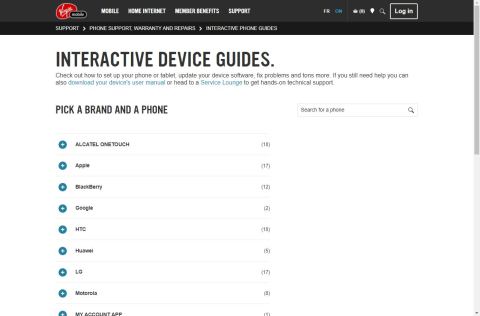
This website is very helpful!

Interactive Device Guides VirginMobile

It teaches effectively with simple bullet point steps, each accompanied by a picture. The website is also sleek to use; as you click through the steps, the images change, and some of the steps even have short video clips indicating movements to be made.

Many phone carriers have support pages for devices, but most of the features of these phones are the same regardless of the company that provides your phone service. I encourage you to check them out when you’re in need, or before!

@VirginMobile: http://www.virginmobile.ca/en/support/step-by-step-phone-guides.html

@Verizon: https://www.verizonwireless.com/support/simulators/

@TracFone: http://support.tracfone.com/

@AT&T: https://www.att.com/devicehowto/dsm.html#!/

@Sprint: https://www.sprint.com/en/support/solutions/device/user-guides.html

@T-Mobile: https://support.t-mobile.com/community/phones-tablets-devices

Thanks #phonecarriers for making these resources accessible to all!

Access Peer-Reviewed Articles

Want to know what the brilliant minds of today are studying or researching? Want to see conclusive evidence for someone’s claim? Check out the databases available at ssclibrary.org!

Click on the images below to get to the library’s subscription services page. Note: One or more of the resources may request your library card number.

Website Subscription Services


General OneFile: a one-stop source for full text news and periodical articles on a wide range of topics. Updated daily, from Gale and NOVEL

General OneFile

Academic OneFile: Peer-reviewed, full-text articles from the world’s leading journals and reference sources, from Gale and NOVEL

Academic OneFile


OmniFile Full Text Select: a database of full text scholarly journals.

Ebsco OmniFile