Did You Know Your Library Offers You These Resources Via Internet 24/7/365? We do!

They say a picture is worth a thousands words!

With that in mind I’m betting that some of you don’t know all the library resources that you can access for free, via the Internet, 24/7/365?

So check out this PDF and let me know if you have any questions about how to access and/or use these free resources!

Did You Know – Library Resources?

And did I mention the Freegal Music Service which allows all card holders of all Southern Tier Library System member libraries (including ours!) to download and keep three free songs per week — is available now instead of the previous go-live date of July 1st? It is! Check it out!

Have a musical day!

Linda R.


Hacking Update — Change Your Apple Password!

It seems hackers have struck again — this time they’ve managed to get passwords to access Apple’s iCloud system — so just FYI — if you own an Apple device it would probably be a really good time to change your password!

It seems with this particular hacking group — they are remotely locking Apple device and then demanding $100 to unlock them — so just FYI!

And granted the article focuses on people living in Australia but even so — one can’t be too careful in our current high tech age where hacking is rampant!

Here’s a link to a Sydney Morning Herald article on the subject:

http://www.smh.com.au/digital-life/computers/gadgets-on-the-go/apple-icloud-users-urged-to-change-passwords-as-hackers-target-idevices-20140611-zrwzy.html

Have a great day!

Linda R.

If You’ve Got Amazon Prime — You Now Have Access To A New Streaming Music Service!

For anyone who isn’t familiar with Amazon Prime – it a service Amazon offers customers for $99 a year; and it includes free 2nd shipping on items purchased from Amazon, free access to Amazon’s Instant Video Library, one free read of an e-book from Amazon’s Lending Library per month and now free access to the brand new Amazon Prime Music Service. Prime Music looks like its going to be similar to Pandora sans the ads.

Here’s a link to a LA Times article on the new Prime Music Service:

http://www.latimes.com/business/technology/la-fi-tn-amazon-prime-music-service-20140611-story.html

And one that takes you directly to the Amazon Prime Music page:

http://www.amazon.com/b/ref=sa_menu_prime_music?ie=UTF8&node=8335758011

And as soon as I have a chance to really check out the Amazon Prime Music Service, which seems to have launched today, I’ll post an update on this blog.

Have a great day!

Linda R.

P.S. Don’t forget we offer free digital literacy assistance by appointment at the library! So if you have a new e-reader, laptop, smartphone or other tech device and are wondering how to use it — call us today to make an appointment — it is free! You can make appointments in person at the library, by phone – Tel: 607-936-3713 and via email: DIGLIT@STLS.ORG

First Monthly Tech Movie @ Library – Friday, June 13, 2014

Join us this Friday, June 13, 2014 for the first in our new monthly series And just a reminder the first film in our new monthly Technology Movie series will be shown this Friday night — June 13, 2014. We’ll be showing the film Short Circuit — the doors open at 6:45 to admit film goers and the movie will start at 7 p.m. sharp. Join us! Linda R.

http://www.imdb.com/title/tt0091949/?ref_=nv_sr_1


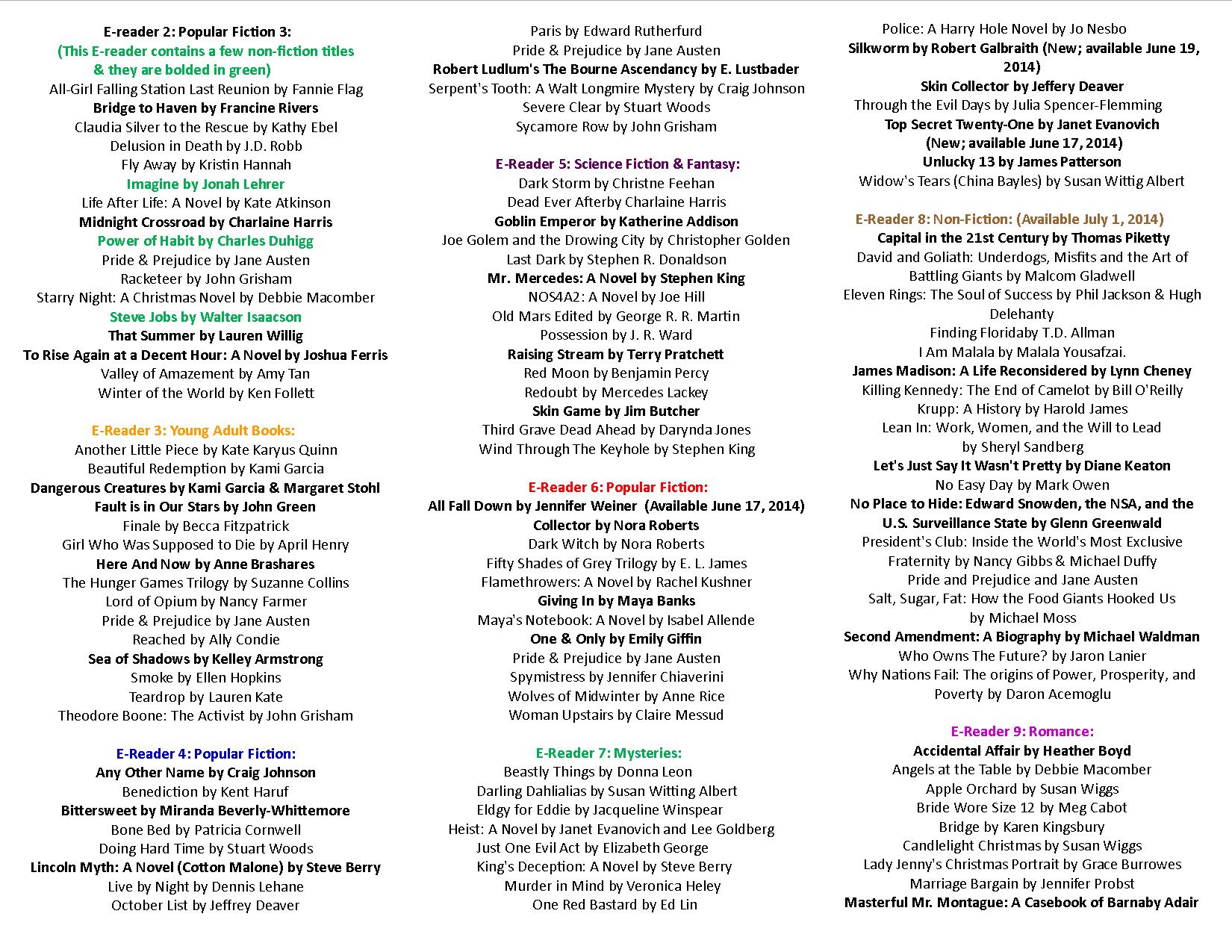
New E-Books Added To Circulating E-Readers!

We’ve just added new e-book titles to the library’s collection of circulating e-readers!

And here they are!

Circulating E-Readers Brochure Updated June 11, 2014 Side 1 Circulating E-Readers Brochure Updated June 11, 2014 Side 2

And if you prefer a PDF version that you can print off and easily share —  here is a link to one:

Circulating E-Readers Brochure Updated June 11, 2014

Have a great day!

Linda R.

SSCL


Backlight Screens Can Indeed Cause Sleeplessness!

I have to start out by noting that the word really is “backlight” and not “backlit” as I keep seeing the word backlight written as both “backlight” and “backlit;” however, the Oxford Dictionary lists the word as “Backlight” and defines it as meaning “Illumination from behind,” so I’m going to go with the term backlight and that definition!  (Concise Oxford Dictionary, page 96).

And with the spelling issue out of the way on to the reasons why I think staring at a backlight screen for hours can indeed cause sleeplessness!

Over the last few years I’ve come across a number of articles on the subject of how using a device with a backlight screen for a long period time, especially late in the day or into the evening, can disrupt your sleep or cause you to have trouble getting to sleep at night.

Now, being a huge tech fan I have been known to read on my iPad or play strategy games like Sid Meier’s Civilization III for hours in the evening! In fact, I’d go home after work and start playing a game or reading an e-book on my iPad while I was making dinner and stay glued to that backlight screen and that game or e-book for hours;  only stopping for about an hour and a half to take a walk and call my mother.  And I did not want to believe that staring at a backlight screen wasn’t good for me, nor that it impacted my sleep in a negative way. However, I did noticed that if I spent hours and hours a day and all evening staring at a backlight screen that it did seem that I either didn’t sleep well or I couldn’t easily get to sleep.

So I decided to try a little experiment!

For two weeks I did not stare at a backlight screen on my iPad, iPhone or computer at night for more than 5 minutes to check email, the weather forecast or to turn on the MapMyWalk app on my phone so I could track the distance I walked each evening. Instead, once I finished my work day, I read a print book, read a book on my e-reader with an e-ink screen (non-backlit), I went for a longer walk, watched a movie, did a few more domestic chores, talked on the phone and I even watered my plants and played with a cat or two a bit more than I would have if I’d been playing a strategy game on my iMac for hours into the night.

And…

I found that the articles I read on the subject of the use of backlight screens being a major cause of sleep disruption were right on the proverbial money!

For all of the 14 days of my test I slept soundly at night and was only awakened early a few mornings by my hungry cat who doesn’t like his diet.  I did not experience the fit-full un-restorative sleep that I had not even noticed had previously become so frequently a part of my life it was almost routine; – and I did not experience it at all – not once!

So instead of continuing to attribute my previous lack of sleeping well to either being overtired due to having a very busy day at work, or the other suspected culprit for a woman of my age – one of those nice premenopausal symptoms, I now realize that the real culprit is looking at backlight screens for hours and hours a day and well into the evening.

Now I haven’t given up playing computer games or reading on my iPad; but I do make sure that I don’t that in the evenings – I cut myself off from any in-depth activity that has me staring at a backlight screen after 6 p.m. And with this new routine I sleep better and have more energy during the day than I did when I spent hours in the evening playing computer games or reading on my iPad until just before I went to bed at night.

So I would say we can equate staring at a backlight screen on a computer, tablet or smartphone for hours into the evening to be in the same keeping-us-awake-at-night arena as drinking regular coffee into the evening!

Have a great day!

Linda R.

References

Backlight. Oxford Dictionaries. Online. Accessed June 5, 2014, http://www.oxforddictionaries.com/us/definition/american_english/backlight

Concise Oxford English Dictionary. Oxford University Press. 2011.

Mayo Clinic. (2013, June 3). “Are smartphones disrupting your sleep?.” ScienceDaily. Online. Accessed June 5, 2014,  http://www.sciencedaily.com/releases/2013/06/130603163610.htm

Mullaney, Rebekah. Depending on How Much and How Long, Light from Self-Luminous Tablet Computers Can Affect Evening Melatonin, Delaying Sleep . Lighting Research Center. Online. Accessed June 5, 2014, http://www.lrc.rpi.edu/resources/newsroom/pr_story.asp?id=235#.U5DhQHKwIwA

Rattue, Grace. (2012, August 24). Sleep Can Be Affected By Back-Lit Tablet Computers. MNT. Online. Accessed June 5, 2014, http://www.medicalnewstoday.com/articles/249402.php

Sutter, John. (2010, May 13). Trouble sleeping? Maybe it’s your iPad. CNN. Online. Accessed June 5, 2014, http://www.cnn.com/2010/TECH/05/13/sleep.gadgets.ipad/


And don’t forget if you need help in learning how to use your new computer, smartphone or tablet or software installed upon your new computer, smartphone or tablet — you can make an appointment with a member of the library’s Digital Literacy Services Department — we’ll sit down with you and assist you in learning the personal technology ropes — it is a free service!

You can call us to make an appointment at: 607-936-3713 or send an email to: DIGLIT@STLS.ORG


Google’s New Self Driving Clown Car – Re/code Article

The self driving car revolution is moving every closer to fruition!

http://recode.net/2014/05/27/a-joy-ride-in-googles-new-self-driving-clown-car-video/

Cool stuff!

Linda R.

New Weekly 5 Minute Personal Tech Tips & Tricks Video Series

The SSCL Digital Literacy Team is launching a new series of weekly 5 Minute Tech videos!

The idea is to present basic personal technology tip and tricks in 5 minutes or less.

And this week our video clip shows you how to clear your web browsing history with a keyboard shortcut. 

Clearing your web browsing history is a useful trick to know in case you ever use a computer that is not your own to access your email, your banking information or simply to search the web — because if you clear your browsing history on a computer that is not your own — then that computer won’t remember which web pages you’ve looked at!

This video, and feature weekly 5 Minute Tech videos can be accessed via this blog or on YouTube.

Here’s the YouTube link for this weeks’ video:

http://youtu.be/FjCcHX_om-M 

Have a great holiday weekend!

Linda R.

New Low Cost Smartphone Features Corning’s Gorilla Glass

Long time tech columnist & reviewer Walt Mossberg reviews and relatively inexpensive new smartphone on the Re/Code site this week and in his video/print review he mentions that this new phone, the Motorola “Moto E,” which is an entry level Android smartphone that costs $129 and can be used via AT&T & T-Mobile, and he mentions in his review that:

  1. The phone is a solid step up from feature non-smart phones and is recommended to people that haven’t had a smartphone before but who don’t want to pay mega bucks for one either up front or as part of a 2-year contract;
  2. And that the phone is using Corning’s Gorilla display glass!

Here’s a link to the article should anyone be thinking of ditching their old feature cell phone and dipping their toes in the smartphone water:

http://recode.net/2014/05/21/what-you-get-in-a-smartphone-that-costs-just-129-unsubsidized/

Have a great day!

Linda R.